Facebook Ads How To For Small Businesses: Fix This First When Results Suck
If your Facebook ads aren’t performing, you’ve probably said some version of this:
“I’m spending money and getting nothing back.”
“It keeps saying Learning or Learning Limited.”
“I don’t know what to change, so I keep tweaking things… and it still doesn’t work.”
This post is a facebook ads how to guide for small business owners who don’t have a big budget or a deep ads skillset, but still need ads to contribute to real revenue.
It’s also part of a wider small business marketing system: not random tactics, a simple structure you can run consistently and improve over time. In small business marketing, ads only scale when the message, offer, page, and follow-up support the same goal.
-> Also read: The ‘start here’ guide for small business marketing
Today’s focus is intentionally narrow:
One main reason small-budget ads stall
One low-hanging fix you can apply right away
Other fixes (messaging, creative angles, landing page conversion, etc.) will be separate posts.
This Facebook ads how to guide is written for small business owners with limited budgets who need clear steps, not theory
What Facebook Ads“Learning” is — and what “Learning Limited” actually implies
When you launch a new ad set, Meta puts it into Learning mode. Learning is the period where Meta tests delivery and tries to figure out:
who is most likely to take your chosen action (purchase / lead / checkout),
where your ad performs best,
and how to spend your budget efficiently.
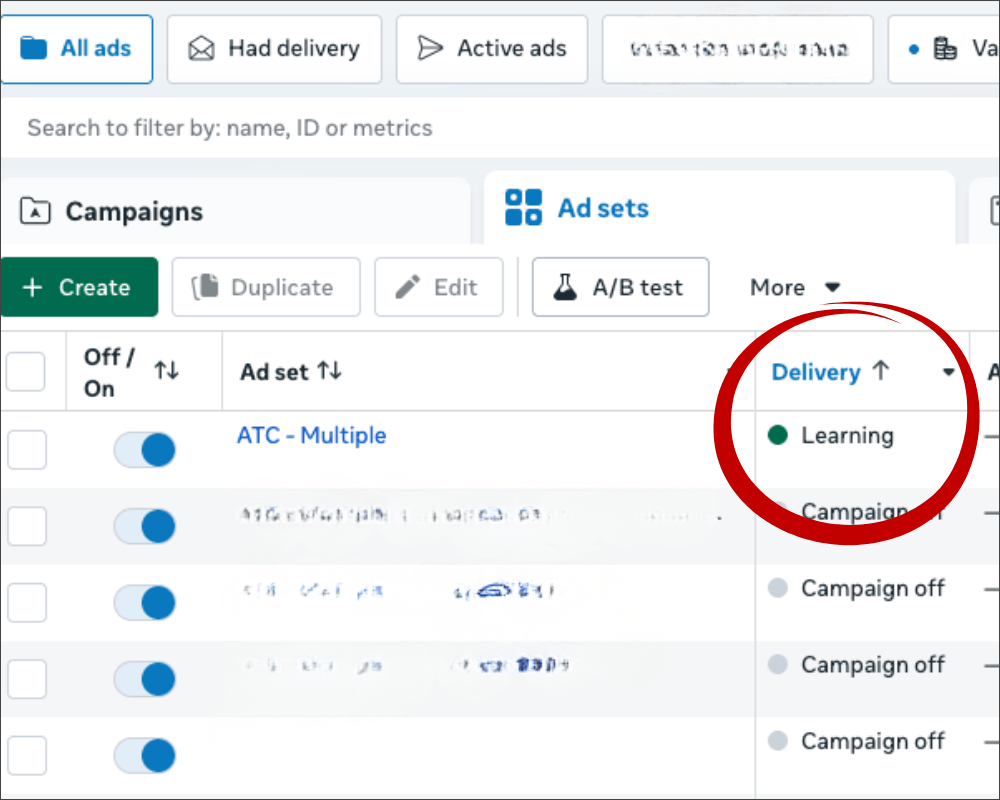
Meta uses a rough benchmark of around 50 optimization events in 7 days per ad set to fully stabilize learning. (Your “optimization event” is whatever you tell Meta to prioritize: Purchase, Initiate Checkout, Add to Cart, etc). After Learning, your ad set usually lands in one of two states:
1) Active
Meta has enough data to optimize confidently.
Implication: results tend to be more consistent (not magically perfect, just less random).
2) Learning Limited
Meta doesn’t expect your ad set to generate enough of the event you chose to fully learn. Implication: results can be more volatile, improvement can be slower, and it’s harder to see a clean pattern.
Quick caveat that will save you time:
If the campaign is performing (profitable purchases / acceptable cost per lead), it’s fine if you still see Learning Limited. Don’t touch what’s working. This post is for when you’re seeing Learning Limited and you’re not getting the results you need.
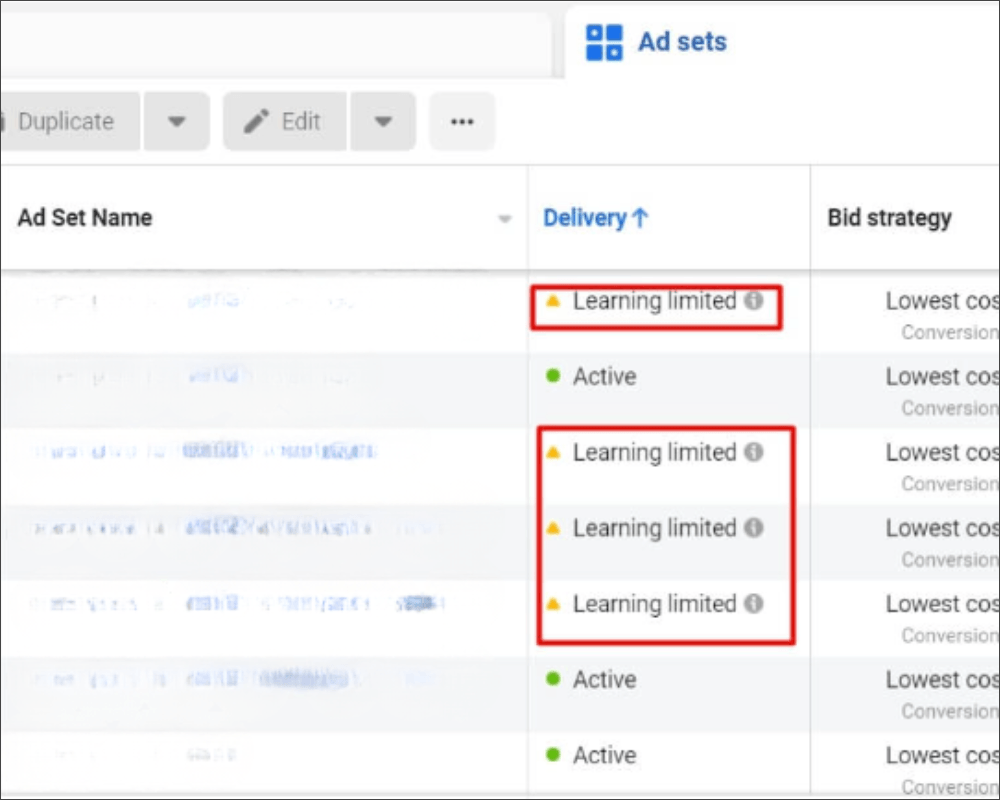
Here’s the key takeaway: Meta needs enough of your chosen optimization event to “learn” who converts, and on small budgets that can be genuinely hard, because Meta simply can’t spend enough to generate the volume it wants (especially for purchases).
So if you’re stuck in Learning Limited and results aren’t improving, there are two practical levers you control:
1) stop splitting your signal across too many ad sets and ads, and
2) if purchase volume is too low, temporarily optimize for a higher-funnel event (like Initiate Checkout or Add to Cart) so Meta has enough data to work with.
We’ll start with the fastest low-hanging fix first: consolidation.
Why small budgets get stuck: not enough signal (and you’re splitting what you do have)
Once you understand Learning Limited, the problem usually becomes obvious:
On a small budget, Meta often can’t spend enough to generate the number of optimization events it wants (especially for purchases).
And many small business owners make it harder by splitting their already-limited budget across too many ad sets and too many ads.
So you end up with the worst combo: low signal + fragmented signal.
Here’s what that looks like in real life:
$10–$50/day total
3–6 ad sets
5–10 ads
What you’ve created here is multiple places that each need conversion data, and none of them get enough. That’s why the first fix is always the same: consolidate so your budget can generate a clear learning signal in one place.
Facebook ads how to: the 7-day consolidation fix
If you only do one thing after reading this facebook ads how to post, do this. You’re going to run a 7-day consolidation test that gives Meta a fair chance to learn and gives you clean data to read.
Step 1: Do a 2-minute reality check (so you stop guessing)
In Ads Manager, customize columns and add:
Delivery (Learning / Learning Limited)
Results (your chosen optimization event)
Cost per result
Amount spent
Now look at the data per ad set and ask:
“How many results am I getting per week per ad set?”
If you’re optimizing for purchases and each ad set is getting 0–3 purchases per week, you don’t have a mystery, you have an account that’s starved for signal.
Step 2: Consolidate to one campaign + one ad set
For the next 7 days, run:
1 campaign
1 ad set
3–4 ads max
Why 3–4 ads?
Because each ad needs enough spend to prove itself. If you run 12 ads on a small budget, you won’t learn anything clearly.
What to pause:
Pause extra ad sets that are basically doing the same job (same goal, same offer, same theme). You’re not “giving up testing.” You’re testing in a way your budget can actually support.
Step 3: Don’t sabotage the test (7-day stability rule)
For 7 days, avoid:
switching optimization events back and forth
rebuilding ad sets
big budget swings
constant edits because yesterday looked bad
If you keep changing things, Meta stays in “trying to figure it out” mode, and you stay stuck reading noise instead of data.
If you’ve consolidated and you still don’t have enough purchase signal, use the event ladder (temporarily)
Consolidation is the first fix because it stops you from starving multiple ad sets at once. But here’s the reality for small budgets:
Even with a clean structure, your budget might still be too limited to generate enough Purchases for Meta to learn, and if purchases aren’t coming in, your campaign can stay stuck in Learning Limited and performance won’t improve the way it should.
So once you’ve done the consolidation test and held it steady, here’s the decision. After 7 days, ask:
Did I run 1 campaign → 1 ad set → 3–4 ads with minimal changes?
Am I still seeing very few purchases (or none)?
Is my ad set still in Learning Limited and results are still weak?
If yes, you likely don’t have enough purchase volume for Meta to optimize around yet. That’s when you use the event ladder.
The rule (simple)
Optimize for the deepest event you can get consistently on your current budget—so Meta has enough signal to learn. The event ladder:
Purchase (best quality signal)
Initiate Checkout (best small-budget bridge)
Add to Cart (higher volume, less qualified)
How to choose the right event (5 minutes):
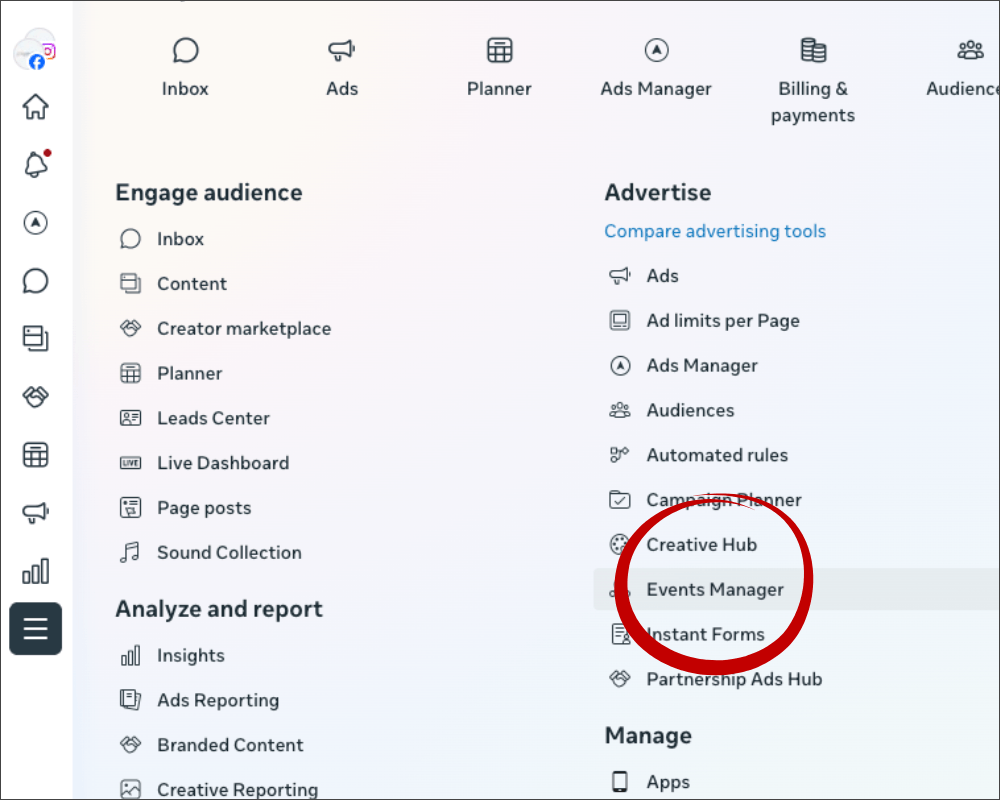
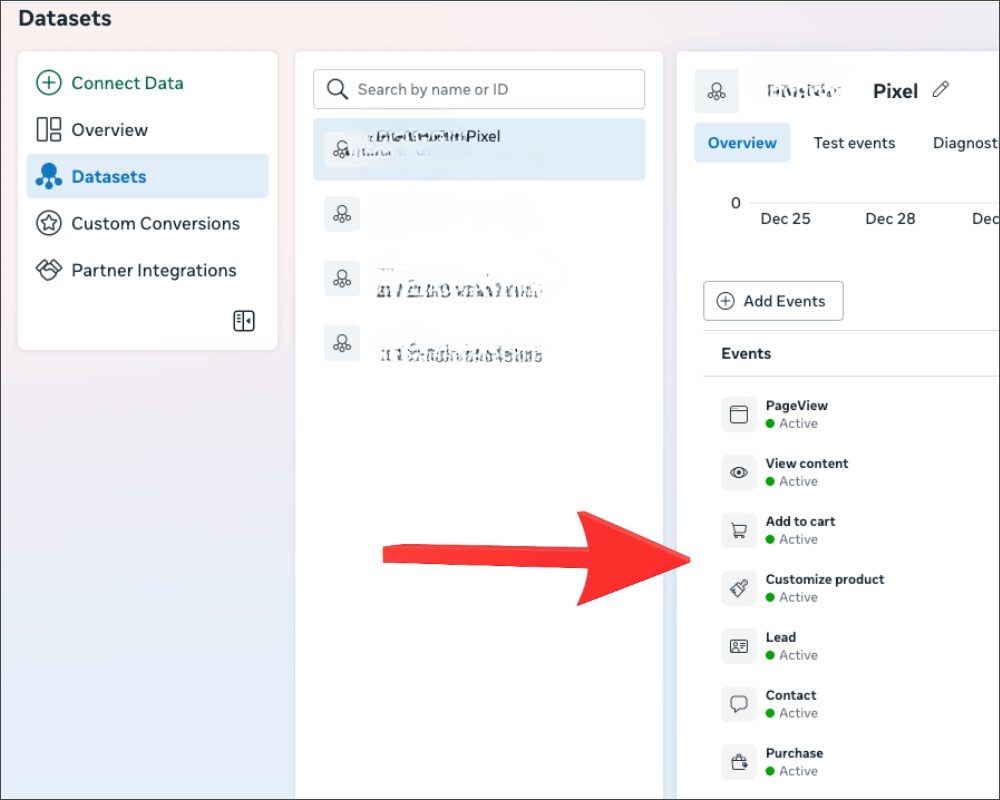
Open Meta Business Suite → Events Manager (see screenshots below)
Select your Pixel / Dataset
Click Overview
Set the date range to Last 14 days
Note totals for:
Purchase
InitiateCheckout
AddToCart
What to pick:
Optimize for Purchase
Choose Purchase if purchases are already coming in regularly. Example: You’re getting 8–20 purchases in the last 14 days from ads (or overall), and your cost per purchase is in a range you can work with. Meta has enough buyer-signal to learn from.
Optimize for Initiate Checkout (best small-budget bridge)
Choose Initiate Checkout if purchases are too rare, but people are getting close to buying. Example: Last 14 days shows 2 purchases, but 15 initiate checkouts. That’s a much stronger learning signal than “Purchase,” and it’s still high intent.
Optimize for Add to Cart (temporary)
Choose Add to Cart only if even checkout volume is low, but carts happen. Example: Last 14 days shows 0–1 purchases, 3 initiate checkouts, but 40 add to carts. Meta can learn from ATC volume while you improve the rest of the funnel and your messaging.
The “don’t get fooled” note :
If you optimize for Add to Cart and carts go up but purchases don’t, that’s your sign to move back down the funnel (Initiate Checkout → Purchase) once volume allows.
What to do on Day 7 (the decision point)
Day 7 is where you stop “watching” and make one clear decision based on what Meta is showing you.
Step 1: Check your delivery status
In Ads Manager, look at Delivery:
If it’s Active (Learning finished):
Great. Don’t start changing things yet. Keep it running for a few more days and optimize based on cost per result and sales.If it’s still Learning Limited:
That usually means Meta still isn’t getting enough of your chosen optimization event to fully learn.
Step 2: If you’re still Learning Limited and purchases are too rare → switch the optimization event
This is when you use the event ladder.
Switch from Purchase → Initiate Checkout if checkout events are happening more often than purchases. Switch from Initiate Checkout → Add to Cart only if checkout volume is too low.
Then run that new setup for another 7 days (again: minimal edits).
Step 3: Re-check at Day 14
After the second 7-day window, ask:
Are you now seeing stronger, more stable event volume?
Are you getting meaningful progress toward purchases?
If yes: Stay the course and only make controlled changes - Migrate your optimization event back down the funnel to Purchase once you have enough volume.
If no (still Learning Limited + still not getting sales): Then the “structure + event” lever isn’t your main bottleneck anymore. At that point, it’s usually one of these:
Creative/message isn’t strong enough to earn attention
The offer/page isn’t converting the traffic you’re paying for
Or there’s friction/trust stopping the final purchase
And the next thing to fix - most often - is creative + messaging, because that’s what decides whether the right people click in the first place. That’s exactly what I’m covering in the next blog post: how to build creatives and messaging that stop the scroll and convert (without sounding generic). Sign up for the newsletter below, so you know when the post is live.
Done chasing tactics and burning ad spend? This Small business marketing system builds the full stack (not just ads) in 6 weeks.
In the 6-Week Marketing Sprint, you get an expert-built, full-stack marketing system built for small businesses - paid ads plus organic, social, email, SEO, and analytics—launched live and handed over with training so you can finally scale to 20k months without guesswork.
→ See how the 6-Week Marketing Sprint works

About Me
Hi, I’m Mala. If you’re tired of trying “all the marketing” and still not seeing consistent sales, you’re in the right place. I bring 20 years of marketing experience (plus building/exiting my own ecom brand) to help you simplify, focus, and get to consistent 20k months.
Get the Weekly Fix
Short, practical small business marketing advice for founders who are tired of guessing. No hype. No spam. Unsubscribe anytime.

MarketingWithMala
Contact: info@marketingwithmala.com
© 2026 MarketingWithMala